When your marketing data
doesn't match reality
I investigate why.
Helping service businesses make confident marketing decisions.
Auditing Google Business Call History
If call volume from your Google Business Profile feels inconsistent, do not guess. Audit the call history.
A lot of businesses see calls rise, dip, or stall and assume demand changed. Sometimes that is true. A lot of the time, the problem is buried in the call flow itself.
Start with the Pipeline Profit Inspection if your listing is visible but calls are not steady.
What Google Business call history actually helps you see
Google Business call history helps you look past surface-level visibility and into actual call behavior. Instead of just seeing that calls are up or down, you can start looking for patterns.
- When calls are coming in
- When calls are being missed
- Whether response timing is slipping
- Whether call activity changed after listing updates or ranking shifts
- Whether weak lead flow is really a visibility problem or a follow-through problem
That matters because a business can blame rankings when the real issue is missed calls, slow response, or inconsistent availability. The pipeline gets weird in practical ways, not mystical ones.
Why this matters
If your Google Business Profile is generating visibility but calls are uneven, call history gives you one of the clearest ways to inspect the handoff between search and contact.
You are not just asking, “Did the phone ring?” You are asking:
- Did the right people call?
- Did calls come in at useful times?
- Were those calls answered?
- Did missed calls cluster on certain days or hours?
- Did a drop in calls happen at the same time as another operational issue?
This is how you stop staring at Google impressions like they are supposed to explain everything.
When to audit Google Business call history
Audit the call history when:
- calls suddenly drop
- calls are inconsistent week to week
- the business is still visible but lead flow feels weaker
- someone says “the phone just is not ringing like it used to”
- you suspect missed calls are costing jobs
- Google Business views are steady but action is soft
This is especially important for businesses where one or two missed leads can materially affect revenue.
What to look for inside the audit
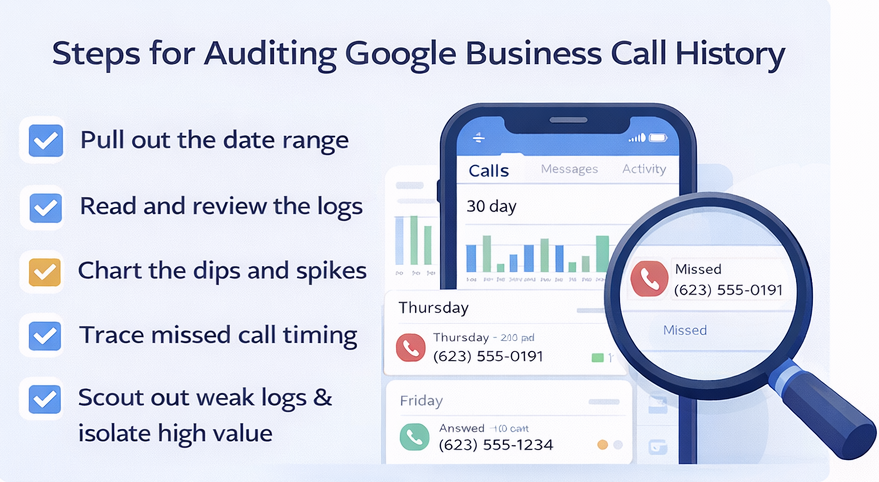
Start simple. Pull a date range that lets you compare a stronger period against a weaker one. Then look for patterns instead of single random events.
- Call timing: Are calls coming in during hours when nobody is answering?
- Missed call clusters: Are missed calls stacking on certain days?
- Lead quality patterns: Are real customer calls mixed with junk or misrouted calls?
- Response weakness: Are calls going unanswered that should have turned into jobs?
- Trend shifts: Did call volume change after edits, ranking changes, seasonality, or staffing issues?
The point is not to admire the log like it is a museum exhibit. The point is to find where the call flow is cracking.
Common problems call history can expose
- The listing is visible, but calls are being missed during peak hours.
- The business is getting calls, but no one is following up fast enough.
- Calls dropped after ranking changes or category confusion.
- Calls are concentrated around specific services, but the listing or site does not support those services clearly.
- Weak call volume is being blamed on SEO when the real problem is operational.
This is why call history matters. It helps separate a visibility problem from a response problem. Those are not the same thing, and fixing the wrong one wastes time.
How this connects to the bigger visibility problem
Google Business call history is one piece of the larger pipeline. It does not explain everything by itself, but it helps show whether search visibility is actually producing reachable opportunities.
If your business is showing up, but calls are erratic, the issue may be:
- weak search intent
- poor listing trust signals
- bad service-area matching
- missed calls
- unclear next steps after the searcher finds you
That is why this page connects closely to: GBP Views vs Actions Explained, Showing Up in Google Maps but No Calls, and Common Visibility-to-Call Breakdowns.
If your business is showing up in Google but calls are inconsistent, the problem is usually not traffic alone. Somewhere between visibility and contact, the pipeline is breaking down.
That breakdown can happen in the search queries bringing people in, the Google Business listing they see first, the page they land on, or the path that leads them to call or book. Most businesses cannot see where that break is happening without stepping back and looking at the entire flow.
The Pipeline Profit Inspection looks at the full path between visibility and booked jobs. It identifies where leads are leaking, where intent is mismatched, and what is preventing people from taking action after they find you.
If you are showing up in search but the phone is not ringing the way it should, start with the Pipeline Profit Inspection.
What to do next
- Pull a meaningful date range from your call history.
- Compare strong periods against weak ones.
- Look for missed call timing, day patterns, and answer-rate problems.
- Compare call activity against visibility and listing performance.
- Inspect the full path between search visibility and booked jobs.
Related links
- Pipeline Profit Inspection
- GBP Views vs Actions Explained
- Showing Up in Google Maps but No Calls
- Common Visibility-to-Call Breakdowns
- Why Your Business Ranks but Isn’t Getting Calls
- Home
- Local SEO Tucson
- Auditing Google Business Call History